Friday, April 10, 2015

Photo Friday!!!!

WOOT!!!!!!!!!!!!  WOOT!!!!!!!!!!!!!!

IT'S PHOTO FRIDAY!!!!!!

I am going to share some photos from my genealogy research.  Please share yours and tell their stories.  Remember everyone's photos are personal please ask permission before borrowing.  Let's see what is out there!!
 
This is my paternal grandfather Charles W. Thomas.  Born and raised in Connecticut.  He was in the Army during WWII and station in Alaska working on planes.  He was a volunteer fire fighter.  He and my grandmother had 9 children.  He was a great family man and was good to his grandkids.  He passed away in 2001.

This is one of my favorite photos.  This is 4 generations of women in my family.  My mother (the baby), my maternal grandmother Virginia Balcom, great grandmother Erma Bliss, and great great grandmother Maude Bowler.
 

Wednesday, April 8, 2015

App Review Wednesday - VeryFamily App

VeryFamily


By: VeryPhone
Created: April 2013
Last updated: February 2015
website: veryfamily.fr
 
There are currently no reviews on the ipad in the app store.
 

From the creators -

Description
Looking to easily draw your family tree ?
You know nothing about genealogy ?
It's almost the anniversary of Grandma and you want to print his family tree with a photo of all her children, grandchildren and great-grandchildren ?
VeryFamily is for you.
Simply enter the full name of the people to show and their relationship and VeryFamily does the rest and draws the family tree of any member of your family.
Of course you can complete the form for each person indicating their date and place of birth, date and place of death and profession if you know them, and attach a photo.
Easily manage remarriages and stepfamilies.
VeryFamily wants general public oriented, accessible to everyone.
VeryFamily not intended to be a tool for professional genealogy.
VeryFamily is just a tool of representation of family trees. Recreational use and intuitive interface make it an original essential application to create beautiful family trees.
VeryFamily trees build full family trees starting from a member of your family (tree trunk) and draws its ascendants (the roots of the tree), but also all its descendants (branches and leaves of the tree) . VeryFamily is not limited, as with other products, to 3 or 4 generations. It will draw all the generations you have indicated.
To add some Fun to your trees, VeryFamily offers several types of representations of family trees. Add frames for photos of people, materialize sky and earth for more realism.
With over 10,000 opportunities to represent your family tree, you should find your happiness.

In options:
VeryFamily manages swap files between applications genealogy. It can export your tree in gedcom format. You can also take a tree that has already been done on another application and send by email, on your iPad, the gedcom file. Very Family will import the data so you do not re-enter it.

VeryFamily can export your family tree generating a PDF file to allow you to distribute it by email to your family or simply to print. However, you can print your tree directly from the app with AirPrint technology.

VeryFamily integrates a module to backup and restore your data to allow you to transfer your trees on another iPad in case of reset or change device.

For any questions or observations, please send an email to support : support@ veryfamily.fr


FROM ME

So recently I did a search for genealogy apps on my ipad.  There are a lot more now then there used to be.  But while writing them down for me to start reviewing this one caught my eye and I knew this was the one I was going to review.  At first glance it looked exciting, super cute and fun. 
 
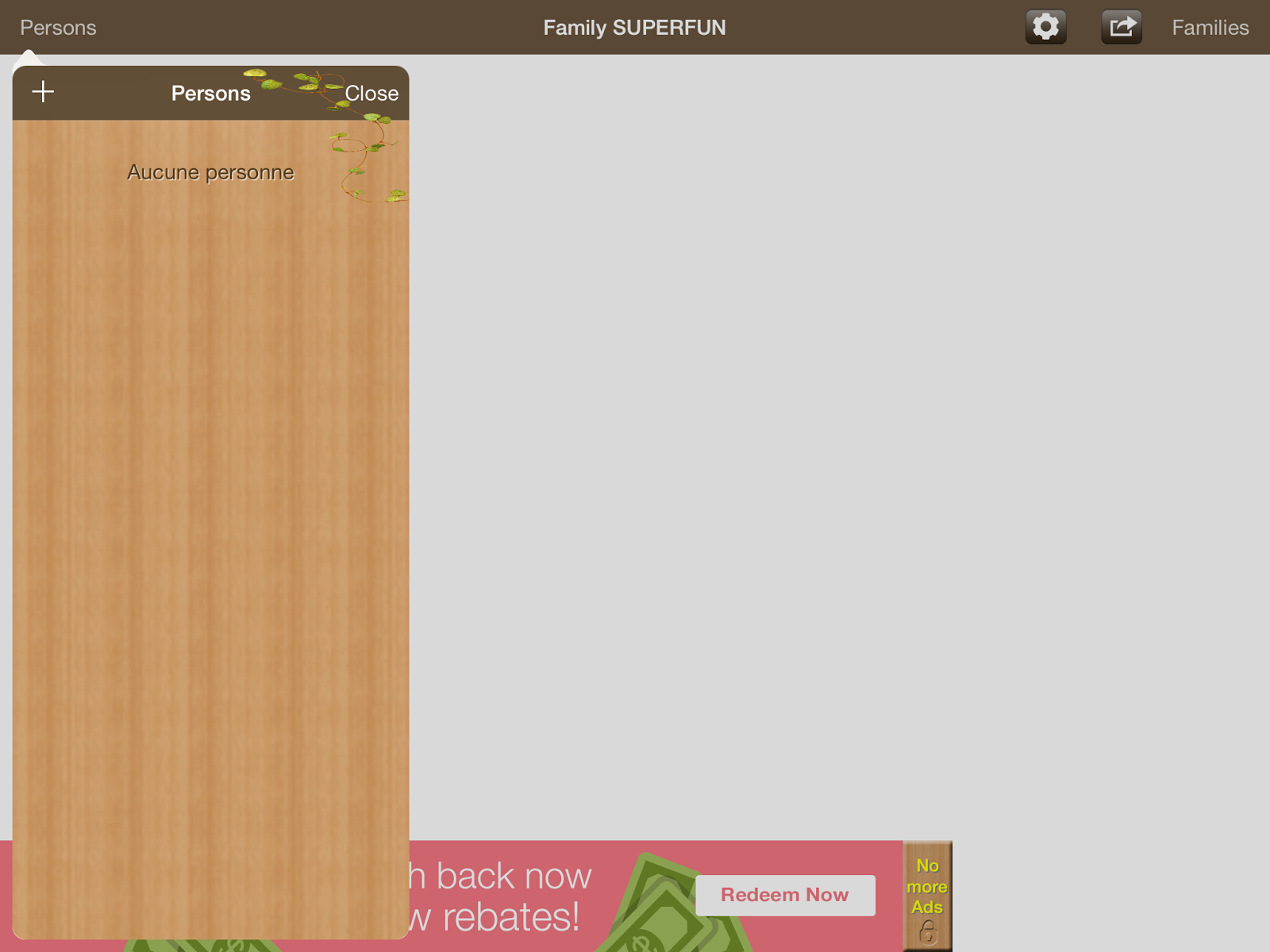
Lets start with the basics.  It's a free download for the ipad.  That is nice.  You can build a tree from the ground up.  You can add cute backgrounds or leave it plain.  You add the persons name, date and place of birth, date and place of death, parents, spouses, and children.  You can also add their picture.

The process of adding people is simple but it it's not.  If in the process of adding someone you click on something and you missed a step, like not adding the gender, it will go back and delete everything you put in on that person.  Also you will notice from my screen shots that the app has both English and French. 


When you add children to a marriage it will only list the parent you clicked on to add them.  You will have to add the other parent.  It doesn't add both parents of the marriage.  I find that odd. 

The tree apparently goes in a straight line and it is set to one side of the screen.  The ads are annoying and when I click on "no more ads" and then click on buy nothing happens.  You are supposed to be able to  import and export a GedCom, PDF export, Print, Back up, and restore but those are items you have to purchase.  I don't know if its individual purchase or just one purchase.  Once again when I click on buy NOTHING HAPPENS.  So I can't even tell you the cost.

Overall I was disappointed in the app.  It is need of work.  I think if they work on it and fix things it might actually be a super cute app.


I would love to hear if you have tried it and what you thought!!!


Friday, November 7, 2014

Find My Past

Have you heard of the website Find My Past??  Yes or No now is a great time to get to learn more about them.  From mid-day today til mid-day Monday they are letting you search their world records for free.  Now I am personally going to take advantage of this opportunity.  I have played around a little with this site but nothing major.  I want to see what they have to offer.  Are they similar to Ancestry.com?  Do they have the same records?  Will I be able to find more? 

http://www.findmypast.com/?ref=logo

 
This what it looks like.
So doing a search for my great grandfather who came to America from Italy produced the following results.
 
As you can see the first 3 results are extremely similar (the last name was spelled in correctly upon arrival and has been that way since.)  I already have these records and have had them for a long time.  The rest are just letters. 

I will keep searching and share with you my results.

Tuesday, February 5, 2013

**Tombstone Tuesday**
 
Today's tombstone belongs to my great grandmother
 
Claudine (Edgett) Eggers
 
Born August 31, 1901 in Otsego County, New York
She was the daughter of
Lewis H Edgett & Grace Belle Bradley.
 
She married William Charles Bryant.
 
They had 2 sons
Maynard F Bryant
&
Douglas Lewis Bryant (my grandfather)


Friday, January 25, 2013

Free Friday

HAPPY FRIDAY ALL
 
Fridays are going to be free Fridays.  The day I really want to hear from you.  What would you like me to research??  Is there an app you want to know about??  Is there an ancestor your having trouble with??  Is there a form you need or something you help decoding. 
 
This is your day.  Tell me what I can do for you.  If I am unable to help you I will get you in the right direction. 
 
So jump in and comment and share share share!!!
 
Thanks

Wednesday, January 23, 2013

Welcome to App Review Wednesday!!!

Welcome to App Review Wednesday!!!

 
What a world we live in today.  We have access to so much information at our fingertips.  It is some what nice that we are able to turn on our computers and research right from home. 
 
The price of gas makes it expensive to travel from place to place when you are centrally located around those records.  But the cost of driving or flying to research and be even worse.  Many do not have the money to do these things.  I know I am one of them.
 
My family is mostly from New York and Connecticut and I lived in Florida for 12 years.  I lived in Florida when I decided to start researching.  And in just the past 12 years it is amazing how many documents have become accessible.  Every year that goes by more and more records can be accessed from the internet.  Most of us are truely greatful for that.
 
Still doing work on the internet at times can only get you so far.  And lets admit nothing really beats face time with loved ones and their stories. 
 
That being said how many of us have an iphone, ipad, ipod touch, or any of the other millions of new smart technology out there?  Now we not only can get our information by working on our computer but we have access to all the same information from out great smartphones.  This truely amazing.
 
I have an iphone and have downloaded a few free apps to try and see what they are like and what their is to like or not like about them.  Then I will share this information with you.
 
The first app I have scanned through is Tombfinder.com
While finding apps I found this app and then found out that there is a webpage.  Surprisingly I did not know about this webpage prior to the app. 
 
There informations
 

Tombfinder App

By SaasSoft LLC

Description
Use the TombFinder App to locate a Headstone wether you are walking or driving. You simply search the name of the headstone you're looking for and hit "driving directions" or "walking directions". Once inside of the cemetery your TombFinder App will lead you right to your destination.

There are currently 230 cemeteries in our database but if you cannot find the record you are looking for, never fear! Suggest TombFinder to your local cemetery. If your suggestion leads to that cemetery becoming our partner, we will give your loved one an eternal memorial account at no charge to you!
An eternal memorial account allows you to upload pictures and memories to the record of your loved one.

Otherwise, you can add your cemetery and upload records from your mobile device.

To get started using the app go to: http://www.tombfinder.com/docs/9

Check your app store soon for new TombFinder updates!


Now for my information. 

 
Right off the bat the app uses your phones gps technology to find your location.  You can touch search and it will bring up a map with your location.  Now you have a choice of local or global search. 


I used my grand fathers name BRYANT.  I know he is buried in Hartwick.  Typing in just BRYANT I recieved a lot of names.  Right off the bat I will tell you it does not tell me how many results.  It shows names and headstones but it does not tell you where they are located.


So I decided to type in Bryant, Douglas I get no response.  I have to figure there are no Douglas Bryants in the system.  I get the same response with just Doug.  Kind of disappointing.


So lets try another name BALCOM.  Globally I was sent 5 names, locally nothing.  Once again no information on where these tombstones are at first glance.  So I decided to click on one. 


Now as you can see from the picture its shows the headstone, the name, the year of birth and death.  Still no information on the cemetery.  I do have options as driving directions, walking directions, add to favorites, edit and add additional personal photo.  Lets click on driving directions.


What the heck??!!?!?  All the way across the country???  Well that is not my Balcom. 


Zooming in I see it is some place north of Seattle, Washington. 

While I like the concept of the app, it is not a good app for me.  Further investigation showed me that none of my family tombstones are on this app.  The description does say that there is currently only 230 cemeteries.  I hope they can get more.  The description also says that its users can help build their database by contacting their local cemeteries and suggest to them to particate.  Or you can add your local cemetery and upload your photos. 

While I do not have much of a following maybe we can help build their database by suggestioning the app/website to our local cemeteries or just help build the site by adding our own photos. 

I believe that this can be an extremely useful app when it gets going.  Especially if the walking directions work.  I have to extremely large cemeteries near me.  How great would it be to find a family member with literally step by step directions. 


Tuesday, January 22, 2013

Terrific Tombstone Tuesday

Tombstones are an excellent source of infomation.  Sometimes it maybe the only source we have on some information.  Like a birth date for example.  Sometimes we have an approximate year and usually a tombstone at the very least will give a definate year.  Sometimes it will give us a death date and an age.  If you get lucky they will have put the age in years, months, and days and you can calcuate from there.  That really helps.  Of course the information is not always correct.  But its something to work with.

Here is one of my tombstones.


Ettore Colovi  1890 - 1967


This the tombstone of my great grandfather, Ettore Enrico Antonio CALOVI.  Now there is not much information on this particular stone but right of the bat the last name is spelled incorrectly.  That was my families doing.  Ettore came to America in 1909 from Italy, so my guess is when he was asked to spell it that is how it sounded.  I know when he signed his name you can tell the A from the O.  I have also been able to have contact with living relatives in Italy that did advise me of the correct spelling. 

But the misspelling is not a bad thing. (at least in this case) since pretty much every document I have been able to find has the name spelling this way.  Also if I did not know anything about him I could use this infromation to begin my search. 


Here is another stone.


This is the stone of my grandfather.  As you can see this stone has a little more than normal information about him.  We have the day he was born and died, also a piece of information about his military career.  This is a great stone because it tells you to look in military records as well as any other records you may have planned on searching.


So how about someone shares a headstone.  Also let me add that if you do take pictures of your family's tombstone please visit findagrave.com  See if their burial information is there and share the pictures as well.  It is a great resource for those who are not able to travel to see the stones themselves.  It is also a great resource to help those find out where an ancestor may be buried if they are not totally sure.